Live Availability Mode Explained: Features, Benefits, and Best Practices
Most sellers on Premium.Chat understand that being Online is better than being Offline. What fewer sellers fully understand is how much of a difference Live Availability Mode makes on top of that. Live Mode is not just a status indicator.
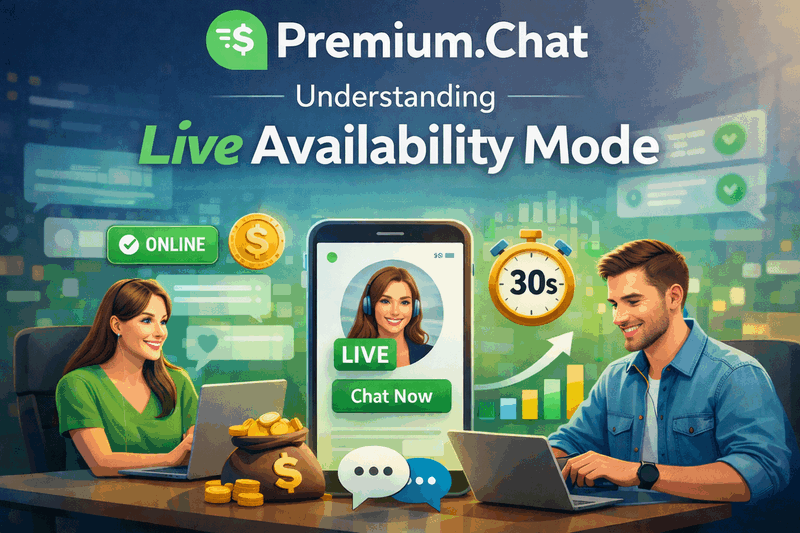
Most sellers on Premium.Chat understand that being Online is better than being Offline. What fewer sellers fully understand is how much of a difference Live Availability Mode makes on top of that. Live Mode is not just a status indicator. It is the single most effective lever for increasing your session volume, your Discover visibility, and your long term audience growth on the platform. This guide explains exactly how it works, why it performs the way it does, and how to use it strategically to maximize what you earn per hour of active selling time.
What Is Live Availability Mode?
Live Availability Mode is a dedicated availability status on Premium.Chat that displays a Live badge on your profile and in the Discover feed. When you are Live, buyers can initiate a paid session with you instantly, with no waiting period, no approval step, and no gap between their request and the session starting. Billing begins the moment the session opens.
This is meaningfully different from the standard Online status. Being Online means you are available, but it does not guarantee immediacy. A buyer who sends a session request while you are Online may wait for your acknowledgment before the conversation begins. That gap, even if it is only a minute or two, is enough for many buyers to lose the impulse and move on to another seller. Live Mode eliminates that gap entirely. The session starts immediately, capturing the buyer at the exact moment of highest intent.
The Live badge also functions as a visual differentiator in Discover. When a buyer browses the feed, profiles marked Live stand out from profiles marked Online. The badge communicates real-time presence and immediate availability in a way that the standard Online indicator does not. That distinction drives more click-throughs to your profile and more session starts from buyers who are ready to engage right now.
How Live Mode Works: What the System Expects From You
Live Mode is built around a simple contract: you signal that you are present and ready, and the platform routes buyers to you on that basis. In return, you are expected to respond quickly. The standard expectation is a response within approximately 30 seconds of a session starting. That is not a loose guideline. The platform actively monitors your responsiveness while Live Mode is active.
If you miss session requests while you are Live, the platform may automatically deactivate your Live status to protect the buyer experience. A buyer who clicks on a Live profile and receives no response has a poor experience, and the platform is designed to prevent that from happening repeatedly. Sellers who consistently miss sessions while Live can have their access to Live Mode restricted, which limits their ability to use it in the future.
This enforcement mechanism is actually good news for sellers who use Live Mode correctly. It means the Live badge carries real credibility. Buyers who see a Live badge can trust that the seller is genuinely present and will respond immediately. That trust is a significant part of what drives the higher conversion rates Live Mode produces. If the badge could be left on indefinitely regardless of responsiveness, it would lose its meaning and its conversion power.
The practical rule is straightforward: only activate Live Mode when you are in a position to give it your full attention. Not when you are working on something else and can glance at your phone occasionally. When you are fully present, notifications on, ready to engage with the first message, and able to sustain that level of focus for the duration of your Live session window.
Live Mode vs Standard Online: The Conversion Difference
The performance gap between Live Mode and standard Online comes down to three mechanics that compound on each other.
The first is friction reduction. Every step between a buyer’s impulse and a session starting is an opportunity for that impulse to fade. When a buyer is browsing Discover and feels the urge to connect with someone, that urge is strongest in the moment they feel it. Standard Online requires the buyer to send a request, then wait for acknowledgment. Live Mode removes the wait entirely. The session starts the moment they initiate. That reduction in friction captures a portion of buyers who would have moved on before an Online seller got back to them.
The second is social proof through visible activity. A Live badge is active presence, not just stated availability. Buyers interpret Live as meaning a real person is on the other side of the screen right now, paying attention. That perception increases trust and increases the willingness to start a session, especially for first-time buyers who have no prior relationship with you and are making a decision based on profile signals alone.
The third is session length. Sessions that start smoothly and quickly tend to run longer than sessions that begin with a delay and an apologetic opening message. A buyer who gets an immediate, warm, engaged response is already invested in the interaction before a significant amount of time has passed. That early investment in the session’s quality makes buyers more likely to extend it, ask follow-up questions, explore new topics, and stay in the conversation longer than they originally planned. Longer sessions mean more revenue per buyer, before platform fees.
How Live Mode Builds Your Long-Term Audience
The income from a single Live session is the visible payoff. The less visible payoff, which compounds far more significantly over time, is the audience you build through Live sessions.
When a buyer connects with you during a Live session, they have the option to follow your profile. Followers receive automatic notifications when you go Live again. This means every successful Live session has two outcomes: the immediate session revenue, and the addition of a potential repeat buyer to your notification list. Over weeks and months of consistent Live sessions, that notification list grows into a meaningful owned audience, a group of buyers who have already paid to connect with you once and who will be reminded to return every time you go Live.
This is one of the most important structural differences between Live Mode and passive availability. A seller who is perpetually Online accumulates profile views. A seller who runs regular Live sessions accumulates followers who are opted into re-engagement. The first creates a dependency on new discovery traffic. The second creates a self-reinforcing loop where each session makes future sessions more likely, independent of what the Discover algorithm does on any given day.
Followers also give you a direct messaging channel on the platform. You can reach out to followers to let them know about upcoming Live windows, new Content Store items, or anything else relevant to your offering. Used thoughtfully, this turns a passive follower list into an active audience that you can mobilize whenever you want to run a high-volume Live session.
The Revenue Impact of Live Mode
The earnings difference between Live Mode and standard Online is not marginal. Every component of the session funnel improves simultaneously when you are Live: more Discover impressions, more profile clicks, higher session start rates, and longer average session lengths. Those improvements stack.
Consider a seller charging $3 per minute who runs two hours of availability per day. Online mode generates sessions, but Live Mode amplifies everything. You get more Discover placement, more profile visits, and when buyers arrive they can see you are actively present and ready. Sessions start more readily and tend to run longer because the engagement quality is higher from the first message. That combination means meaningfully more gross session revenue from the same two hours of availability time before platform fees.
The Content Store adds another layer. While you are Live and generating more Discover traffic, buyers who visit your profile but do not start a session can still purchase from your Content Store. Live Mode is not just a session driver. It is a traffic driver that benefits every monetization channel on your profile simultaneously. Sellers who have stocked their Content Store before running Live sessions consistently report Content Store purchases occurring in parallel with live session activity.
Best Practices: How to Run Effective Live Sessions
Choose Your Time Slots Based on Data, Not Guesswork
The most effective Live sessions happen during periods of high buyer activity. For most sellers on Premium.Chat, evening hours on weekdays and weekend afternoons generate the most inbound traffic. But the right time slots for your specific niche and audience may differ. Review your session history to identify which hours generate the most session starts and which days produce your highest-value buyers. Build your Live windows around that data rather than defaulting to generic peak hours that may not match your specific buyer patterns.
Consistency matters as much as timing. Buyers who find you Live at 8pm on Tuesday evenings will start to expect you there. Over several weeks, that expectation turns into a habit, and habit-driven sessions are among the most reliable revenue in a creator business. A predictable Live schedule gives your followers something to plan around and gives you a structured earning routine that is easier to sustain than sporadic availability.
Treat Every Opening Message as a Conversion Moment
The first message of a Live session determines whether it becomes a 5-minute interaction or a 45-minute conversation. Buyers are most responsive immediately after a session starts, when their curiosity and intent are at their peak. A generic opening like hi there or ready to chat wastes that peak and hands the buyer the responsibility of driving the conversation forward, which many will not do with confidence.
Open instead with something specific and engaging. Acknowledge what the buyer might be looking for. Ask a question that invites them to share something personal or specific. Use language that signals genuine interest and energy. The goal of your opening message is to make the buyer feel immediately that this was worth starting, that something real and engaging is happening on the other side of the screen. Buyers who feel that from the first exchange stay longer, engage more deeply, and are far more likely to follow your profile and return.
Keep Your Session Window Focused and Bounded
Live sessions are high intensity. Sustained responsiveness, genuine engagement, and the mental energy required to deliver a quality interaction are real costs. Sellers who run Live Mode for four or five hours without breaks often find their session quality declining over time, which affects both session length and the likelihood that buyers will return.
A more effective approach is to run focused Live windows of 60 to 90 minutes with your complete attention, then take a break before the next window. Two focused 90-minute Live sessions in an evening will almost always outperform four hours of degraded availability, both in revenue per hour before platform fees and in the quality of the buyer relationships you build. Treat your Live windows the same way a professional treats a performance: prepare, execute at full intensity, then recover.
Turn Live Mode Off When You Step Away
This sounds obvious, but it is the single most common mistake sellers make with Live Mode. Leaving Live Mode active when you step away for a few minutes, to make a coffee, check another app, or respond to something else, creates missed sessions that damage your responsiveness record and frustrate buyers who clicked through specifically because they saw a Live badge. Missed sessions while Live are a credibility cost and, with enough repetition, an access cost.
The habit to build is simple: Live Mode on when you sit down to work, Live Mode off when you stand up. No exceptions. If you use a Custom Schedule for your general Online availability, Live Mode should be a deliberate overlay you apply manually within those windows rather than a permanent status you forget to manage.
Using Live Mode Alongside Your Other Premium.Chat Settings
Live Mode works best as part of a layered availability strategy rather than as a standalone setting. The most effective sellers on Premium.Chat use each availability tool for its specific purpose and combine them to cover the full range of scenarios.
Custom Schedule handles your baseline availability automatically, switching you Online during your regular hours and Offline outside of them. This ensures buyers can find you and your profile remains active in Discover without requiring daily manual management. Live Mode is then activated manually within those Custom Schedule windows when you are ready for a focused, high-intensity earning session. The combination gives you automated baseline presence plus peak-performance Live windows on top of it.
Your Content Store runs in parallel with everything else. When Live Mode drives more traffic to your profile, that traffic benefits your Content Store automatically. Buyers who browse your profile while you are Live can purchase content immediately, and buyers who follow you after a Live session are future customers for both live sessions and content purchases. Stocking your Content Store before running Live sessions means every Live window generates two revenue streams simultaneously: active session income and passive content sales.
For a full overview of how your availability settings fit into a complete Premium.Chat strategy, see The Ultimate Guide to Setting Up Your Premium.Chat Profile. For setup instructions specific to availability settings including Custom Schedule, see How to Log In, Create a Password, and Set Your Availability.
Start Using Live Mode in Your Next Session
If you are not already using Live Mode regularly, your next Live session is the simplest experiment you can run. Pick a 60-minute window during a time you know buyers are active, activate Live Mode, stay fully present, open every session with a strong first message, and track how your session starts and average session lengths compare to your standard Online sessions.
The difference is measurable and most sellers notice it immediately. Create your free Premium.Chat profile if you have not already, and use Live Mode from your first active session. For more on building your profile and availability settings from scratch, read The Ultimate Guide to Setting Up Your Premium.Chat Profile.
Frequently Asked Questions
Can I use Live Mode alongside the Custom Schedule setting?
Live Mode and Custom Schedule serve different purposes and work best in combination. Use Custom Schedule to define your regular Online hours automatically, then activate Live Mode manually within those windows when you are fully focused and ready to respond immediately. This approach gives you the reliability of automated availability plus the conversion boost of Live Mode during your most productive earning periods.
Does being in Live Mode also help my Content Store sales?
Yes. When you are Live, increased Discover visibility drives more buyers to your profile, and those buyers can browse and purchase from your Content Store while they are there, even if they do not start a live session. This means Live Mode simultaneously increases your active session income and your passive content store revenue, making it one of the highest leverage activities available on the platform.
Does Live Mode increase my visibility in Premium.Chat Discover?
Yes. Profiles with an active Live badge receive increased visibility in Premium.Chat Discover compared to standard Online profiles. Buyers browsing Discover see Live sellers as higher priority options because the Live badge signals immediate availability. This increased Discover visibility translates directly into more profile visits, more session starts, and more opportunities to gain new followers.
How do I turn on Live Mode on Premium.Chat?
Live Mode is activated through your availability settings. Go to Settings and select Availability, then switch your status to Live when you are ready to begin an active earning session. Ensure you are in a distraction-free environment before activating it, have your device notifications on, and are prepared to respond to incoming session requests immediately. Turn Live Mode off as soon as you need to step away.
How does Live Mode affect my overall earnings on Premium.Chat?
Live Mode increases earnings through three compounding effects: more Discover visibility means more inbound session starts, faster session starts mean higher conversion rates from interested buyers, and longer average sessions result from the trust built by a responsive and engaged opening. Sellers who use Live Mode consistently during focused windows report meaningfully higher per-hour earnings compared to passively being set to Online, because every component of the session funnel improves simultaneously.
How does Live Mode help me build a long-term audience on Premium.Chat?
Every buyer who connects with you during a Live session has the option to follow your profile. Followers receive automatic notifications when you go Live again, which means each Live session you complete builds a list of warm, high intent buyers you can re-engage without any additional promotion. Over time, consistent Live sessions compound into a growing follower base that generates repeat session income independently of new buyer discovery.
How is Live Mode different from being set to Online?
Standard Online status indicates you are available but does not guarantee an immediate response. Live Mode is a stronger signal: it tells buyers you are actively present and will respond within seconds. Profiles with an active Live badge stand out more prominently in Premium.Chat Discover than standard Online profiles, and the instant session start removes the delay that can cost conversions when buyers are in the moment and ready to pay.
How quickly do I need to respond when I am in Live Mode?
When you are in Live Mode, you should be prepared to respond to session requests within approximately 30 seconds. The platform monitors your responsiveness while you are Live, and if you consistently miss or ignore session requests, your access to Live Mode may be restricted. This is why Live Mode should only be activated when you are fully present and able to give your complete attention to incoming sessions.
What happens if I miss sessions while in Live Mode?
If you miss session requests while Live Mode is active, the system may automatically turn off your Live status to protect the buyer experience. Repeated missed sessions can limit your access to Live Mode going forward. To protect your Live Mode access, only activate it during focused earning windows when you are genuinely available, and turn it off as soon as you need to step away, even briefly.
What is Live Availability Mode on Premium.Chat?
Live Availability Mode is a status setting on Premium.Chat that displays a Live badge on your profile, signaling to buyers that you are ready to start a paid session immediately. When you are Live, buyers can initiate a chat, call, or video session without any waiting period or approval step. This instant start capability drives higher conversion rates because it removes the friction that causes buyers to lose interest while waiting.
What is the best time of day to use Live Mode?
The most effective time slots for Live Mode are typically evenings on weekdays and weekend afternoons, when buyer activity on the platform tends to be highest. However, the best approach is to review your own session history to identify which hours generate the most inbound requests for your specific niche, then concentrate your Live Mode windows around those peak demand times. Consistency matters: buyers who find you Live at the same times each week are more likely to return reliably.
What should my opening message be when a Live session starts?
Your opening message sets the tone for the entire session and directly affects how long the buyer stays. Avoid short or generic greetings. Instead, open with something warm and specific that invites engagement: ask a question, acknowledge what the buyer is looking for, or introduce what you offer in a way that creates anticipation. Buyers who feel immediately welcomed and engaged are significantly more likely to extend the session and return for future ones.