Frequently Asked Questions
Billing
Which cards do you accept?
We offer a variety of payment options worldwide for your convenience. We accept all major credit and debit cards, including Visa, Mastercard, and Discover as well. For your convenience we also offer Apple Pay, and Google Pay. Additionally, we also accept gift cards bearing these logos. Please ensure your card is valid, with a correct postal and cvv code, and has sufficient funds for us to pre-authorize the card before initiating a chat.
Can I confidently use my credit or debit card on premium.chat? What steps do you take to ensure my financial information's safety?
At Premium.Chat, we prioritize your online safety and security, especially when it comes to handling sensitive information such as credit and debit card details. Your personal details along with your card details are never given out to anyone. We adhere to stringent protocols and incorporate multiple layers of security to ensure a safe transaction process. Here's an overview of some of our security measures:
-
Secure Sockets Layer (SSL): We use SSL technology to create an encrypted link between our web server and your browser. This ensures all data passed between us remains private and integral, offering a secure environment for transactions.
-
Payment Card Industry (PCI) Compliance: We strictly comply with the Payment Card Industry Data Security Standard (PCI DSS), which is a set of security standards designed to ensure that all companies accepting, processing, storing, or transmitting credit card information maintain a secure environment.
-
Secure Vault System for Payments: Behind the scense, and seamlessly, we use a secure vault system for tokenized payments. This means that your sensitive credit / debit card information is replaced with a unique series of numbers (tokens) that only has value in the specific merchant's secure vault system. It offers an additional layer of protection against fraud.
As an organization, we're deeply committed to maintaining your trust by keeping your personal and financial information safe and private. Rest assured that your transactions on Premium.Chat are carried out with optimal security.
What is the amount of the pre-authorization?
The pre-authorization amount for a chat session on our platform is determined by two factors: the per-minute rate set by the independent seller and the anticipated duration of the chat.
So for example: the person you're chatting with, we'll call them the "seller", sets a price of $1.99 for each minute of the chat. They think the chat might last about 20 minutes.
Before you start chatting, we need to make sure your card can cover the cost. So, we do a quick check, or "pre-authorization". This is just a temporary hold, not an actual charge. Any left over amount when the session ends will be automatically credit back to the card you used, and detailed records can be found in your receipts on our site.
Here's how we figure out the amount:
We take the cost per minute ($1.99) and multiply it by the expected chat time (20 minutes). So, $1.99 times 20 equals $39.80. This is the amount we check your card for.
Remember, we only do this check when the seller is ready and accepts the chat. And, for per minute chat you only get billed for the time you actually spend chatting. If you extend your chat because you'd like to chat longer than expected, we'll let you know before you are pre-authorized again when any extra time is added.
How to find the Pre-authorization amount
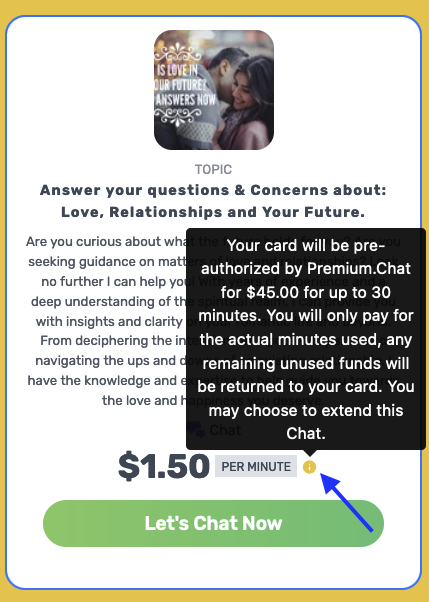
To see the pre-authorzation amount go to the seller's profile, and look for the price per minute. Next to the price per minute you will see an "i" that is highlighted. When you click or hover over it you will see the amount of time set for the chat, the price per minute, and the pre-authorization amount. You can see this before you decide to begin your session to ensure your card has enough funds beforehand. This way when your chat is accepted it will work successfully.
Why do you pre-authorize my card?
A card pre-authorization is a common practice in many businesses, including online services like Premium.Chat. The primary reasons for pre-authorizing a card are:
Verification: Pre-authorization checks whether the card is valid and has sufficient funds for the transaction. This ensures that the service can be provided without interruptions.
Fraud prevention: Pre-authorization helps in preventing fraudulent activities.
Securing Payment: In businesses where the final amount may vary, such as a pay-per-minute chat, pre-authorization secures the payment for the estimated service amount. If the actual service usage exceeds the pre-authorized amount, further authorizations can be made such as extending your session, and media purchases.
Remember, a pre-authorization is not a charge. It's a temporarily holds a specific amount on your card to ensure that those funds are available when the actual final charge is made. The amount of your pre-authorization will vary depending on who you plan to chat with. To learn more about the pre-authorization amount read here.
How Your Billing is Finalized
When your session ends, the settled amount used is billed and displayed to you. This amount can also be found in the receipt history of your account. Any remaining blocked amount from the pre-authorization is released back to your account. The timing for this can vary depending on your bank's policies which is usually several business days.
Per Minute: When you choose a pay per minute option, you will only be billed for time used. Any remaining unused funds will be returned to your card.
Flat Rate: When you choose a flat rate option, you will be billed the full amount regardlress of the time used which means no funds will be returned to your card. All minutes are used up when your session ends.
When will the temporary pre-authorization drop off my card?
The exact timeline for when a pre-authorization automatically drops off your card can vary depending on the financial institution that issued your card. Generally, it takes about 2-5 business days (not including weekends which are non business days) for the pre-authorization to be removed. In some cases it may take longer. Please be rest assured that your funds will be returned. At Premium.Chat when you have selected per minute billing, you will only be billed for time used. To see the exact amount you are billed go to your receipts.
If a pre-authorization hold has not dropped off after 10 business days, or if you have any other concerns about it, it's a good idea to check with your bank or credit card company directly for assistance. They have access to the most current information about your account and can give you accurate information about the status of pre-authorization holds. If you need further assistance, or have a concern you may contact us using the contact form.
For a thorough understanding of how pre-authorizations work on the Premium.Chat platform, please review the following FAQ questions for more details:
Why do you pre-authorize my card?
What is the amount of the pre-authorization?
How do I get help with a billing question?
If you have questions about charges, pre-authorizations, or how billing works on Premium.Chat, you can find detailed answers on our dedicated Billing Support page. It covers topics like temporary pre-authorizations, refund eligibility in the case of technical issues, and how billing is calculated based on session type. We want everything to be easy to understand, so you always know what to expect.
Why Is My Card Declined?
To begin with, it's important to clarify that we do not directly decline card transactions. Instead, we strive to process your charges, and any decllines are responses received from your bank or credit card provider. It's crucial to establish the cause by either examining your account details online or getting in touch with your card provider using the contact number on the back of your card. Once the issue is sorted, you can continue with your transaction.
Let's look at some common reasons for transaction declines:
-
A number of factors could lead to your credit card being declined: account configurations, insufficient balance, incorrect details, or an expired card.
-
Mistakes could occur while inputting the card number, CVV/CVC, zip/postal code, expiry date, or name, leading to transaction failure.
-
Insufficient balance in your account or an exceeded credit limit could also result in a declined transaction.
-
Your bank may flag a transaction as suspicious, requiring you to confirm it either through a call or a text message. In such cases, it's advisable to inform your bank that you're trying to complete the payment, and it's safe to proceed. Once done, you can retry the transaction.
If the decline continues to happen you should reach out to your bank or credit card company (the phone number on the back of the card) to find out what the issue is so they can help you resolve it. Then you can resume your sessions on premium.chat.
You may also want to consider trying a different card by adding it to your wallet.
Why does the billing say paused?
The "paused" status on your billing indicates that our system has detected a disconnect or a drop in the text chat, video chat, or call cconnection between the buyer and the seller on Premium.Chat. This could be due to a poor internet connection, or if one of the parties has left the chat page. Often the billing will start again when the connection issue is corrected. It could be a temporary issue, or one of the parties intended to leave the chat in such cases the chat will end. We encourage both buyer and seller to wait in the chat as the billing clock will stop during this time.
Our platform is designed to automatically pause the billing under such circumstances to prevent the buyer from being overcharged when the per-minute fees are still running if the communication is interrupted. It's important to understand that this doesn't indicate an issue with Premium.Chat itself, but rather it's a fail-safe mechanism we've implemented to ensure the utmost fairness in billing.
Our priority is to protect both the buyers and sellers on our platform, and this feature is a part of our commitment to provide a trustworthy and transparent service. We always aim to ensure that buyers only pay for the actual time spent in active, meaningful interaction. This ensures long-term satisfied customers who will use the platform more often.
What is your refund policy?
Our goal is to exceed your expectations with every chat experience. While we do not offer refunds in most cases—because sellers dedicate their time to be available for you—we do make exceptions for verified technical issues that may prevent delivery of the service.
If you believe a technical issue occurred, please contact our billing support team and include your chat session ID (found on your Receipts page) and the username of the person you chatted with.
For full details, visit our Billing Support page.
How do per minute and flat rate sessions work, and what are the differences?
Premium.Chat offers two types of sessions: per minute and flat rate.
-
Per Minute Sessions: You’re charged only for the time you spend in the chat. The rate is set per minute, and you can end the session at any time. This gives you full control over how long the conversation lasts.
-
Flat Rate Sessions: You pay a fixed price up front for a set amount of time (e.g., 10 minutes for $50). The cost is the same whether you use all of the time or end the session early. Unused time cannot be saved or used later, so it’s best to make the most of the full session once it starts.
Key Differences:
-
Flexibility: Per minute sessions let you leave anytime. Flat rate sessions are prepaid for a fixed duration.
-
Cost: Per minute charges based on how long you stay. Flat rate is a one-time fee no matter how long you use (up to the set time).
-
Usage: Flat rate encourages you to use the full time — because once started, any unused time is lost.
Choose the option that best suits your needs and how you prefer to chat!
What should I know about the automatic session extension for buyers on Premium.Chat?
Understanding Automatic Session Extension: Premium.Chat is designed with your convenience in mind, featuring an automatic session extension that ensures your conversations continue smoothly up to the set time limit without interruption. This feature is enabled by default and automatically extends the session just before it reaches the maximum duration preset by the seller. This allows you to continue your discussion without the hassle of manually extending the session time.
Notification and Convenience: One minute before your session is scheduled to end, you'll receive a notification informing you that the session will automatically extend. This advance notice is intended to give you sufficient time to decide whether to continue with the extension or conclude the conversation. This system enhances your experience by eliminating abrupt endings, giving you control over your time and interactions, and making the communication process both user-friendly and transparent. This seamless integration of extensions and notifications underscores Premium.Chat's commitment to providing a platform that respects your needs and optimizes your interaction experience.